A tour of The Desk • Every screen, and every question
This is the whole thing, screen by screen.
A booking arrives, gets quoted, gets signed, gets played, gets invoiced and gets paid. Below is each of those screens as it actually looks, in the order you would meet them, with the contacts, letters, shop and figures that sit around them, and the questions people ask before they start.
No card charged for fourteen days • Cancel in one press
Two minutes
If you would rather watch it
The same tour, narrated, with the part that matters marked on every screen.
Or step through the same screens yourself, one at a time.
Bookings
One list, and the quiet things at the top
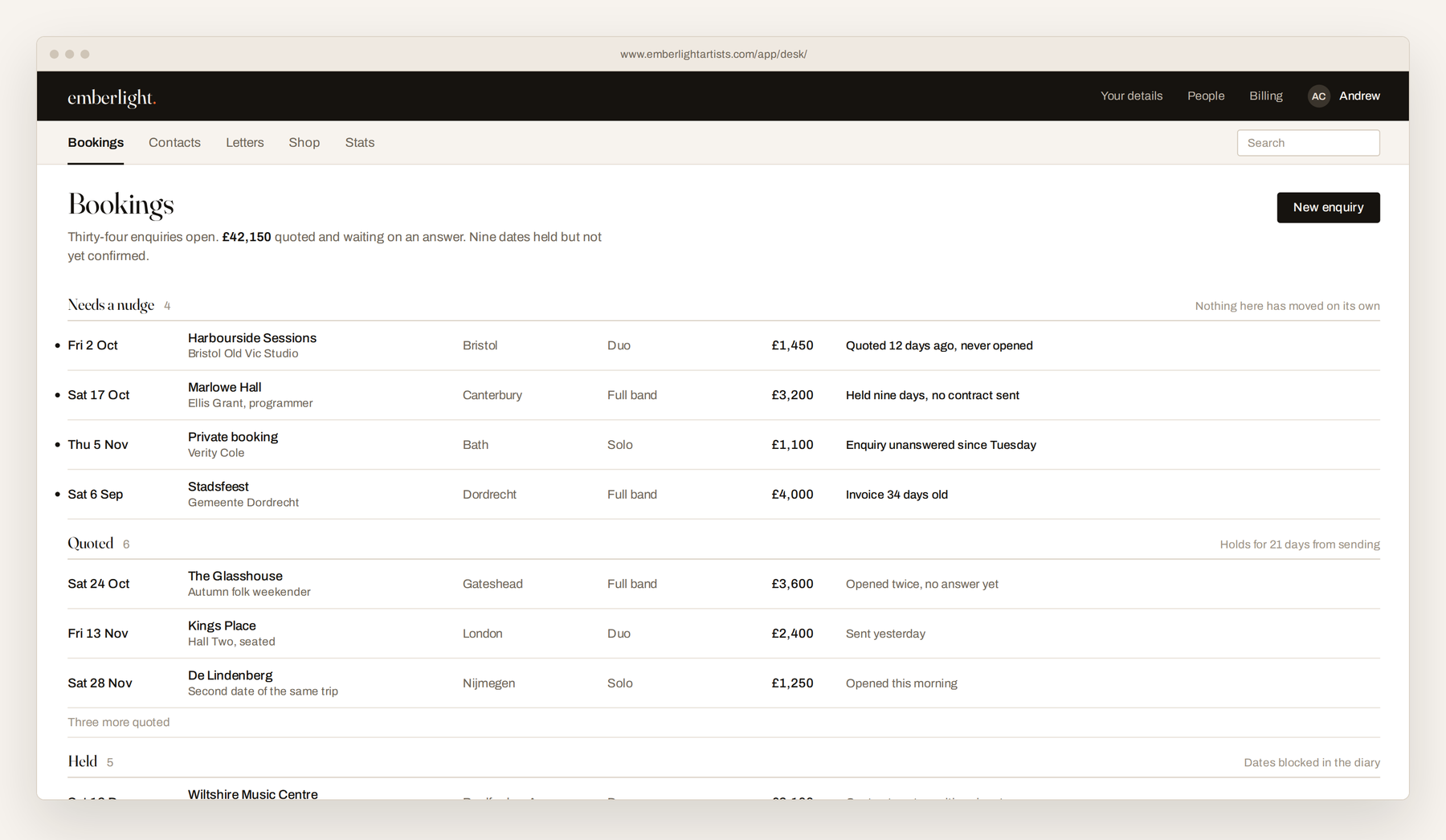
Bookings is the front page. Every enquiry sits on it, grouped by where it stands, and each one is a single record that moves from first email to paid invoice. Nothing is copied from one screen to another.
Above everything sits what has gone quiet. A quote nobody opened, a held date with no contract, an invoice thirty days old. The work that leaks away is rarely refused, it is just never followed up, so the desk puts it where you cannot miss it.
Quotes
Priced from your rate card, not from memory
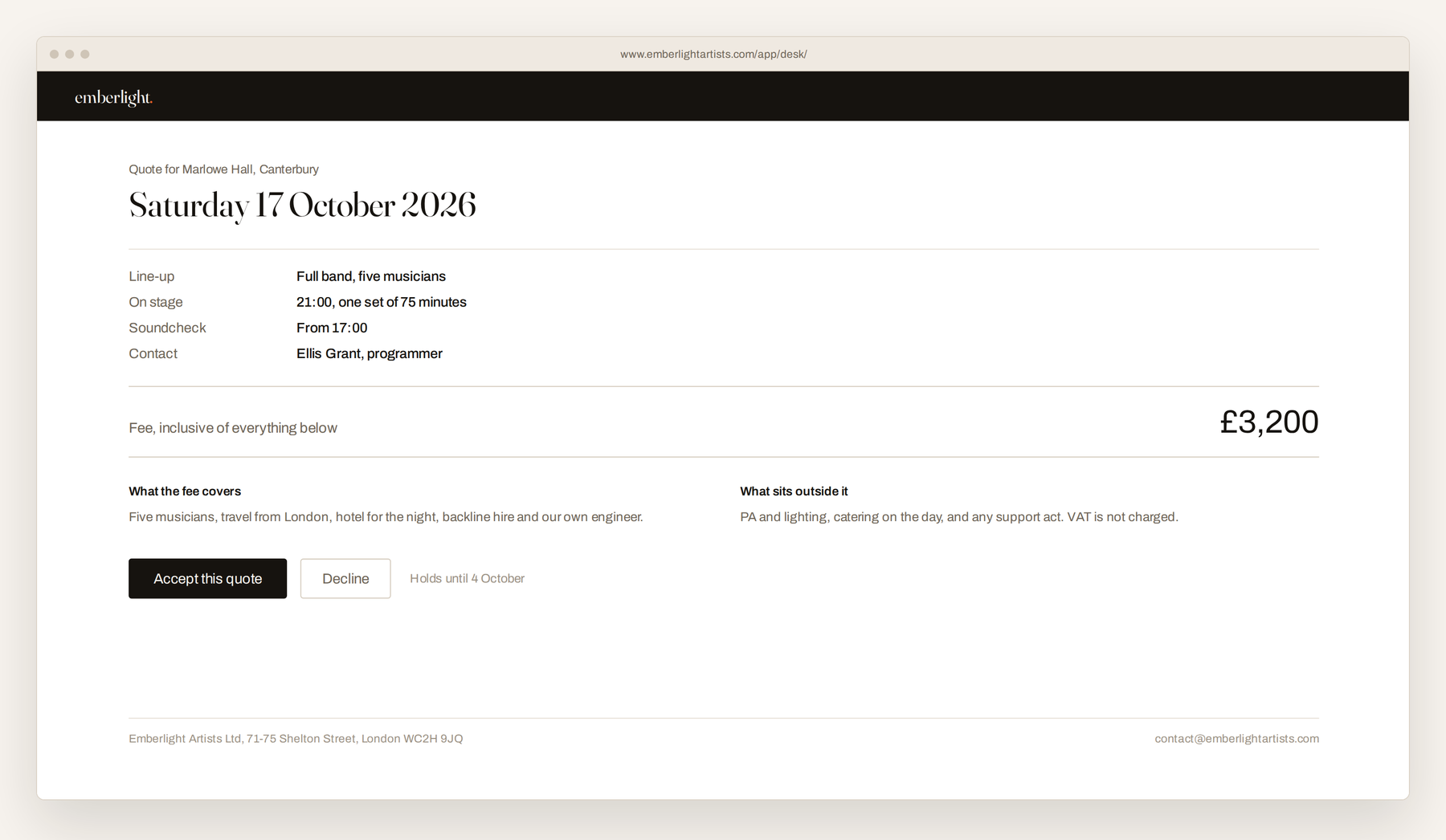
Your rate card has two areas and a row for each way you perform, so the desk proposes the right fee for that line up and that town. You can change it. If the figure drops under your private floor, it says so before it goes out.
The client gets an email in your colours with a private link. The page tells them what the fee covers, what sits outside it, and how long it holds. Two buttons. Accept, and the date is held and the diary is blocked.
Contracts
Signed on the same link
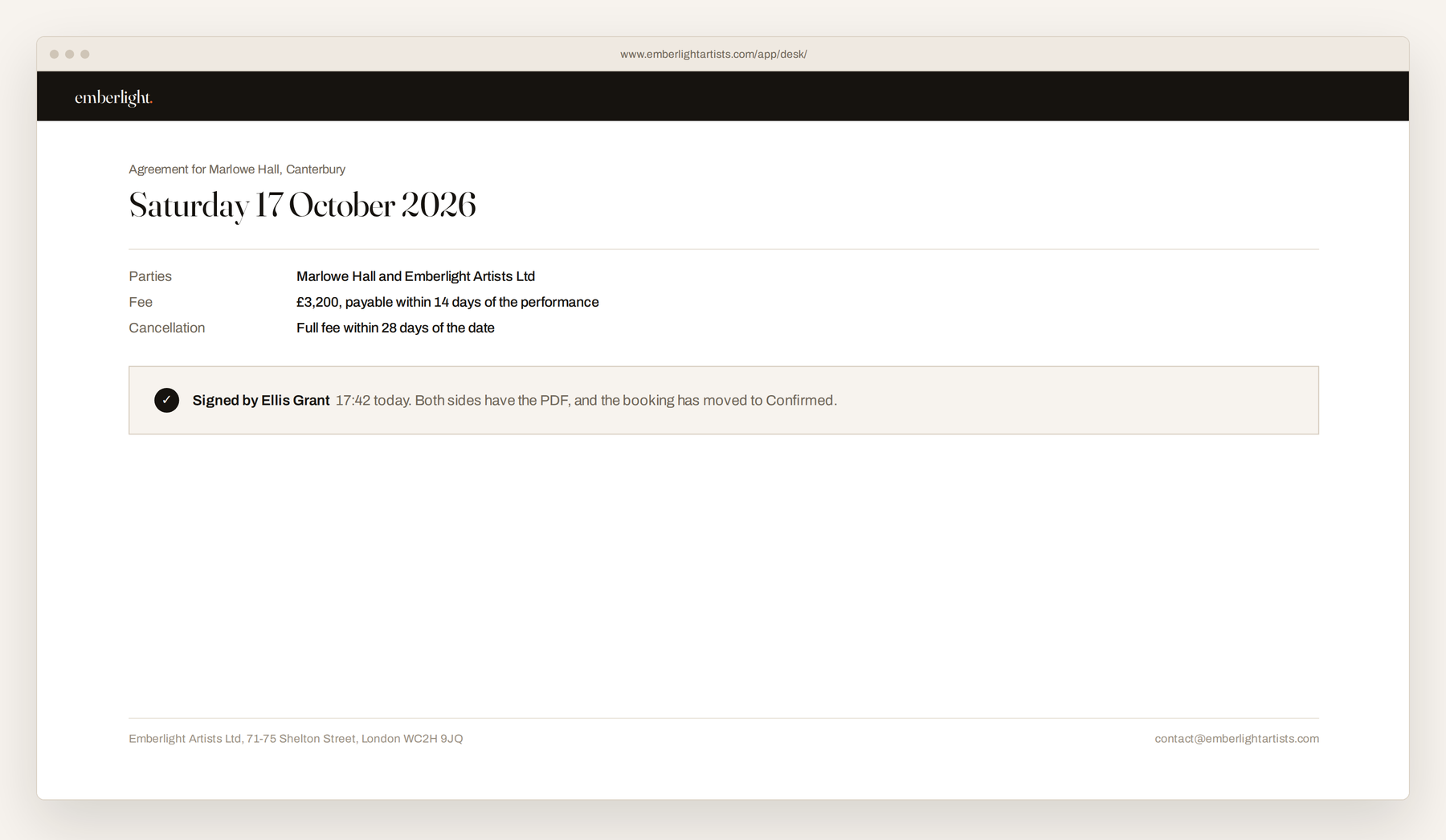
Once a date is held, the agreement is built from the record. Parties, date, venue, timings, fee, what is included, payment terms. Read it, change anything, send it.
The client types their name to sign. Both sides get the PDF, the signed copy is stored against the booking, and the record moves itself to Confirmed. Nothing is printed and nothing is scanned back.
The day itself
Everything the day needs, on one page
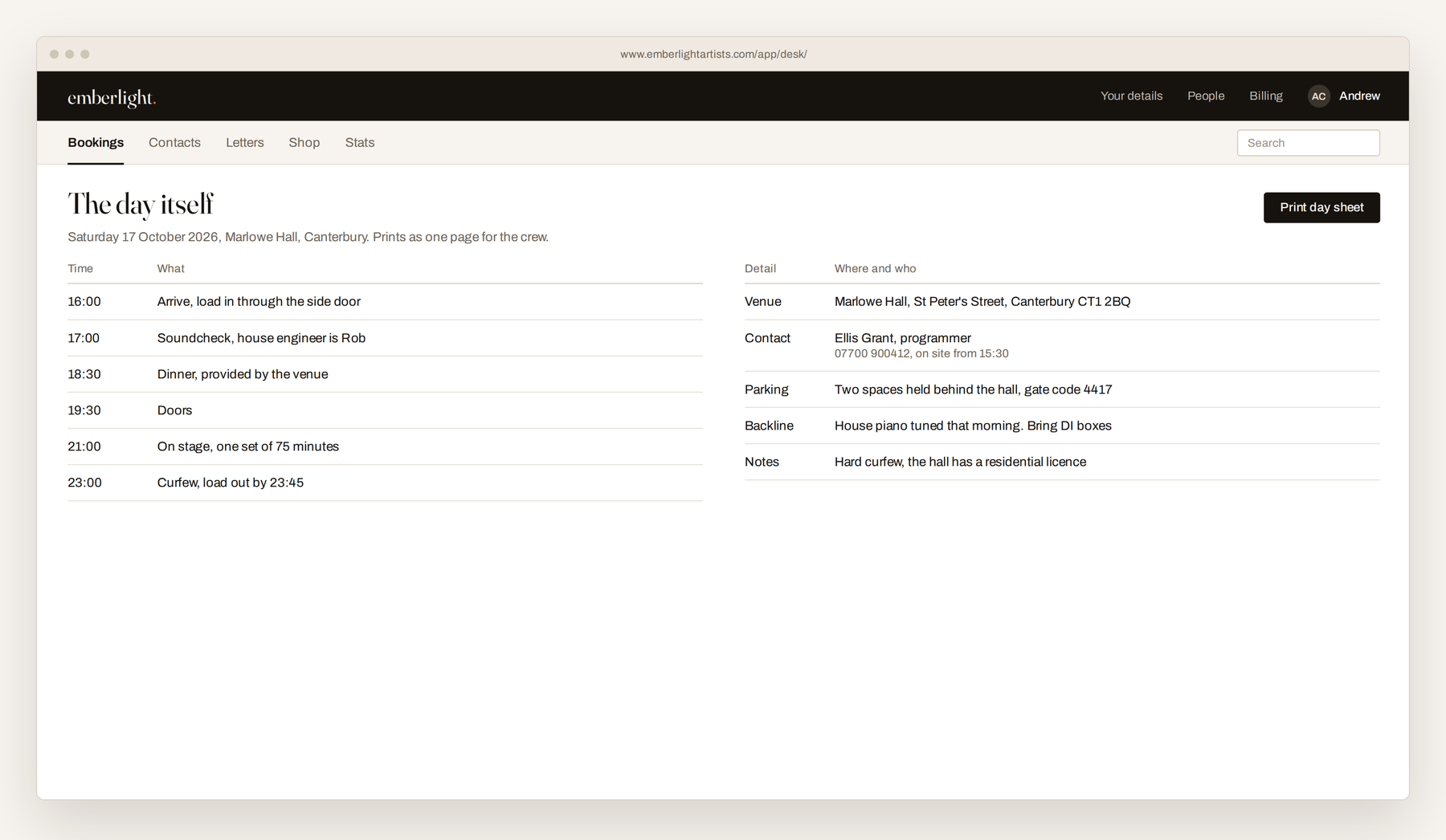
Arrival, soundcheck, doors, on stage, curfew. The venue address, who to ask for, where to park and what the house has. It prints as a single day sheet.
It is the page you send to a musician who has never been to the venue, and the one you look at in the van.
Invoices
Your numbering, your bank details
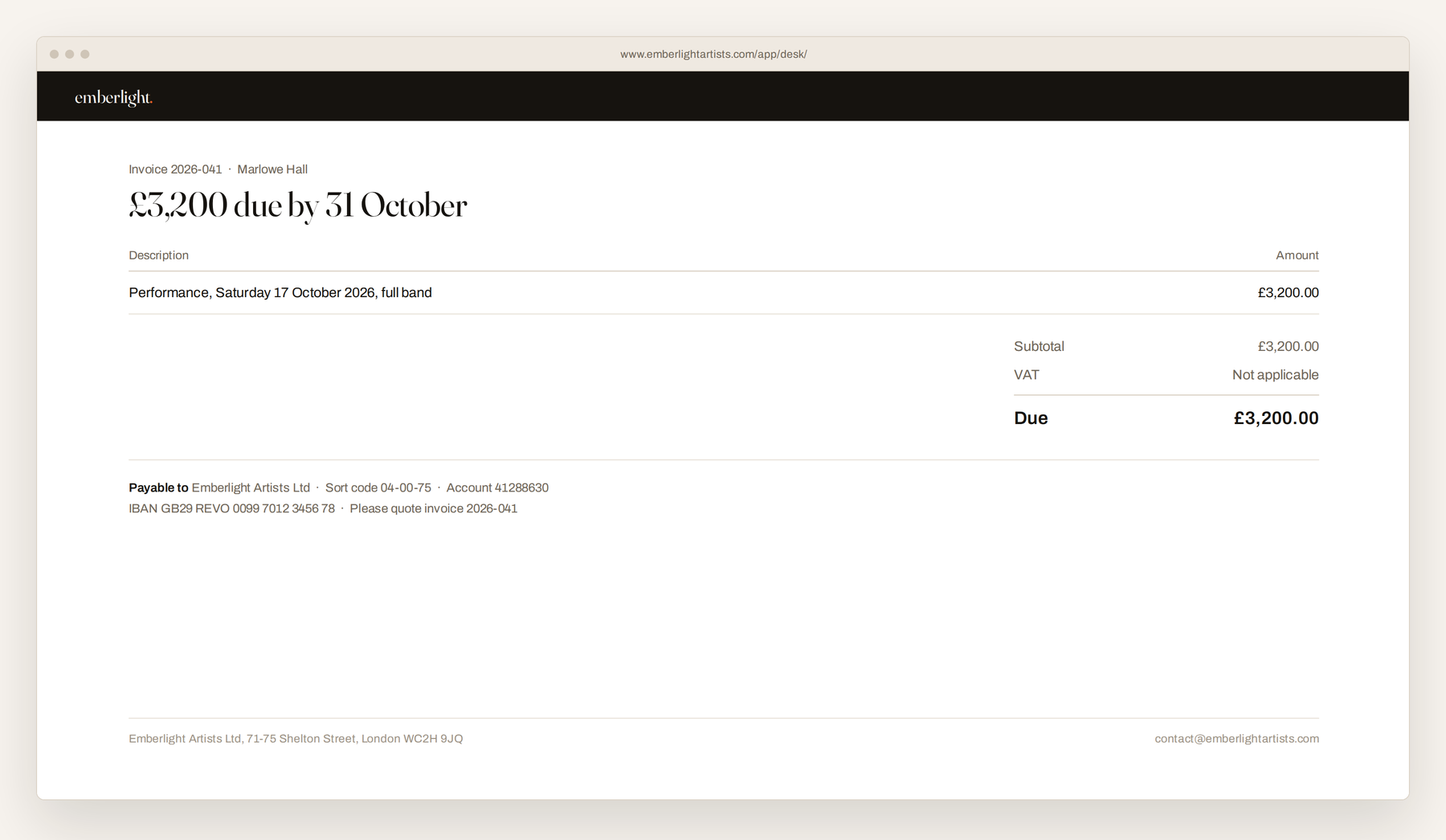
After the show the invoice is raised from the record, carrying your company details, your bank details, IBAN and BIC for anyone paying from abroad, and VAT if you are registered. Numbering is automatic and sequential.
The client gets a link they can print or save, with your own pay online button if you have one. When the money lands you press Paid, and it counts in the figures. No money passes through us at any point.
Contacts
The whole history, on one timeline
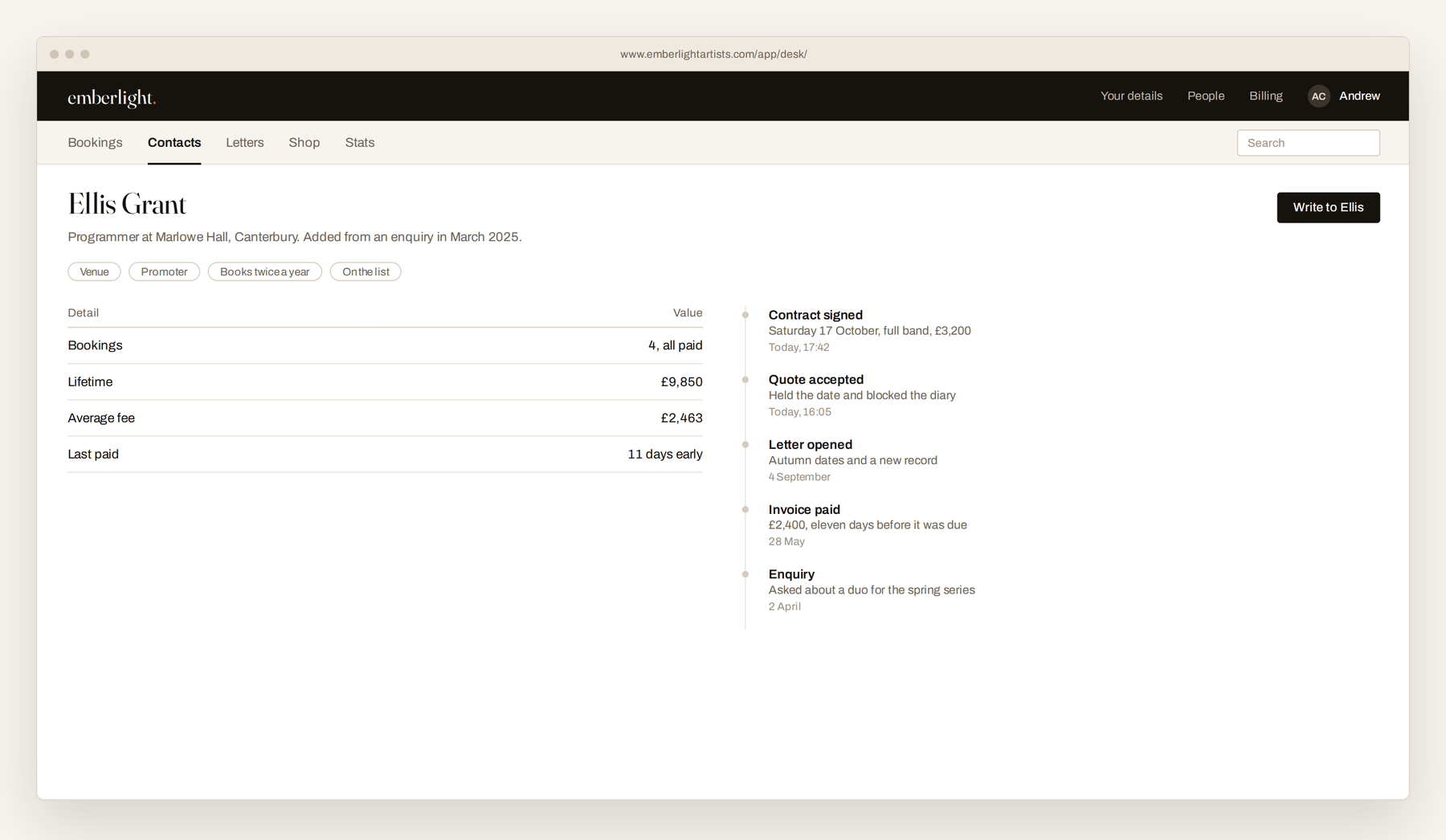
Every enquiry and every shop order creates a contact, matched on the email address rather than added twice, so the list builds itself while you work.
Open anybody and you see the lot: every booking, every quote, every letter they opened, every order, every note, in order. Tag them as a venue, a promoter, press. Write to one person in your colours, with replies coming back to your own address.
Letters
A mailing list that keeps its own paperwork
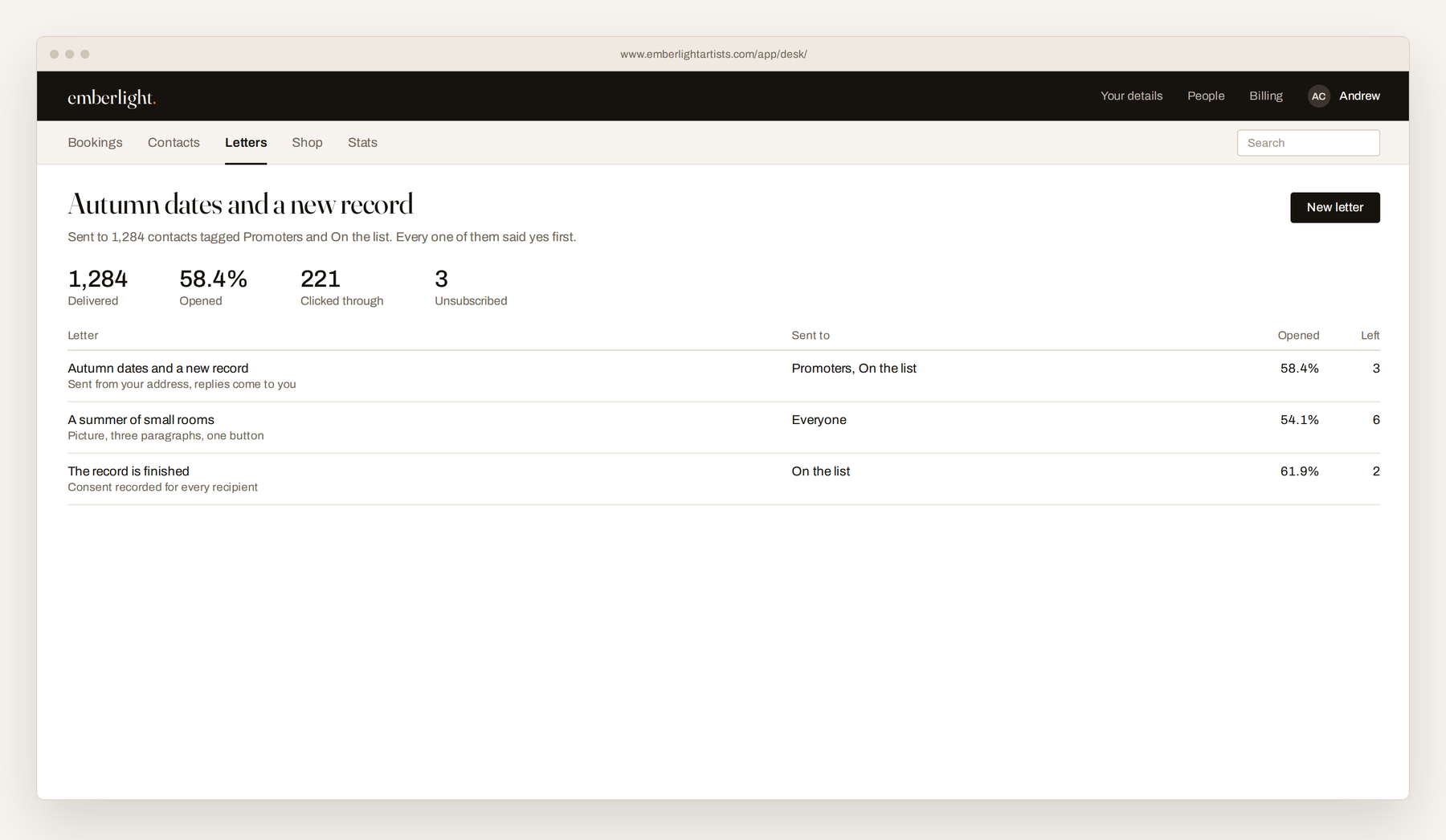
People join by confirming a link, which is what the law and the spam filters both want, and the record of that consent is kept for you. Every letter carries a one press unsubscribe, and somebody who leaves is never mailed again.
Writing one is a heading, some paragraphs, a picture, a button and your sign off. Letters go out through an authenticated mail server under your name, which is why they reach inboxes rather than spam folders.
The shop
Records and merchandise, counted in the same place
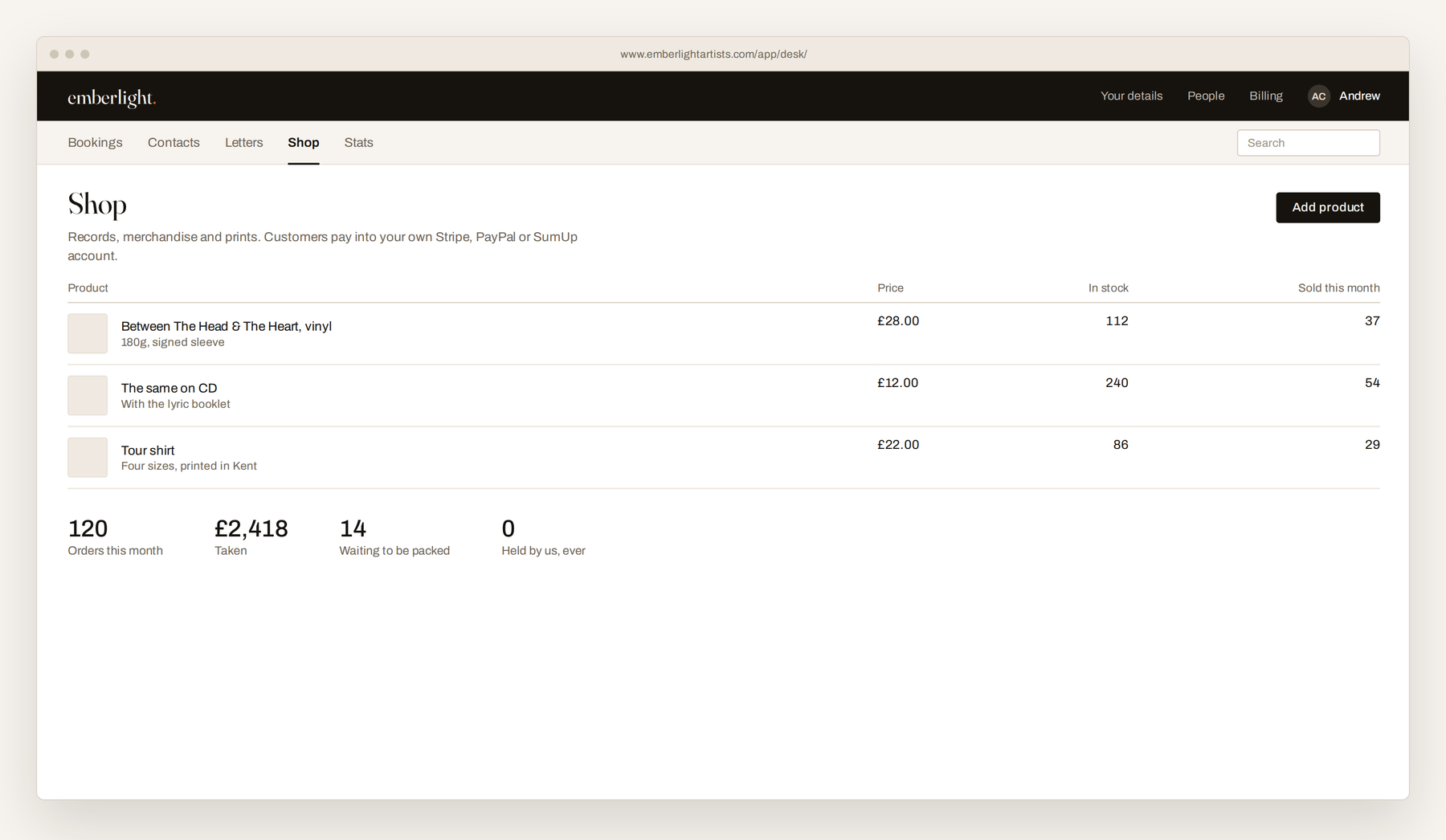
Products with photos, prices, weights and stock, discount codes, shipping bands and orders. Your storefront is a page in your colours that you link to from your own site, or embed in a page of it. Nothing has to be installed anywhere.
Card payments go through your own Stripe, PayPal or SumUp account, so the money moves from the customer straight to you. Orders appear against the customer's contact record, next to their bookings.
Stats
What is working, and what the pipeline is worth
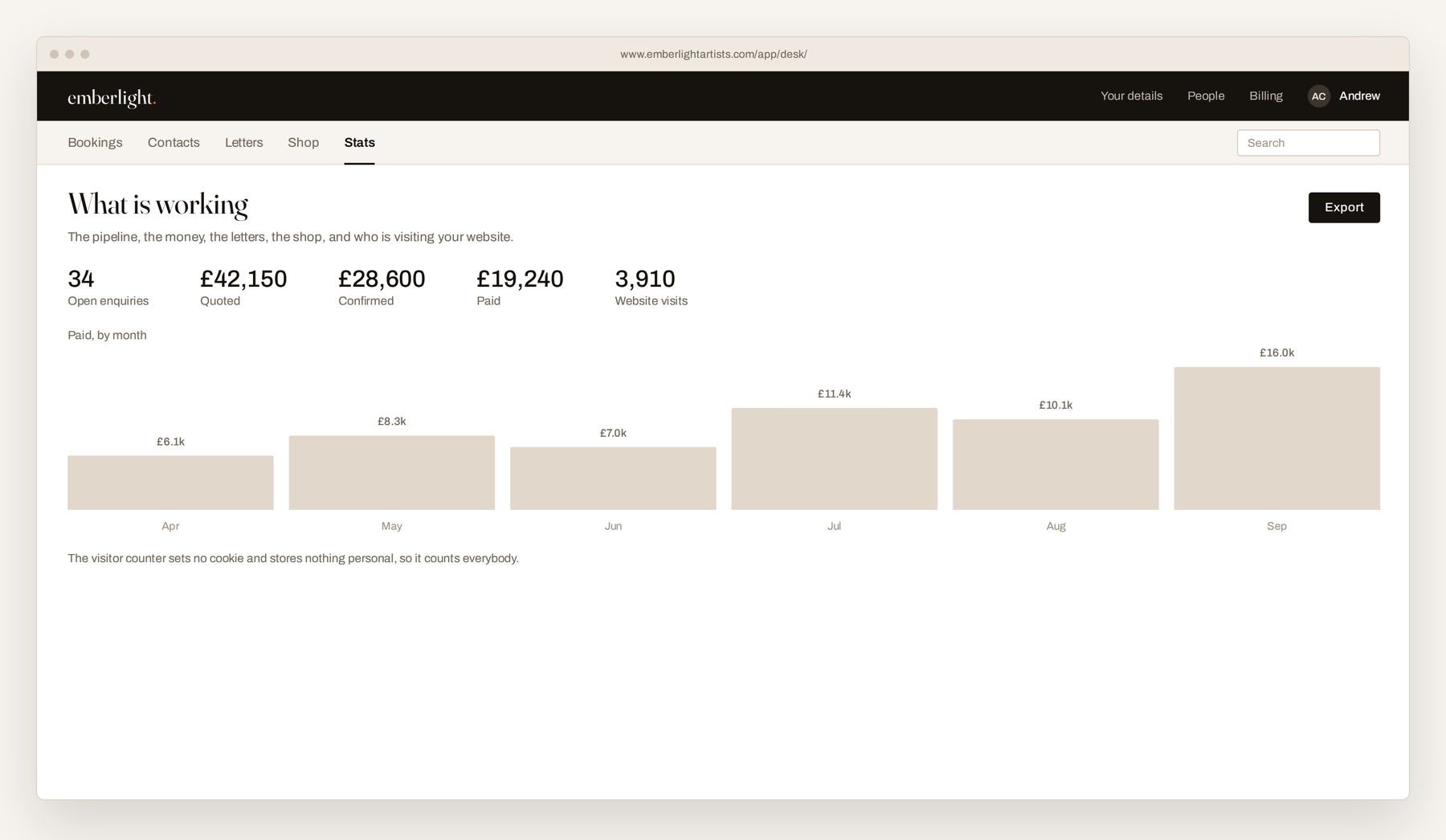
How many enquiries sit at each stage and what they add up to. Quoted, confirmed, invoiced and paid by month. Letters sent, opened and left. Orders and revenue.
Plus your website: visits by day, which sites sent them, and clicks out to Spotify, Apple Music and the rest. The counter sets no cookie and stores nothing personal, so it counts every visitor rather than only the ones who accept a banner.
People and roles
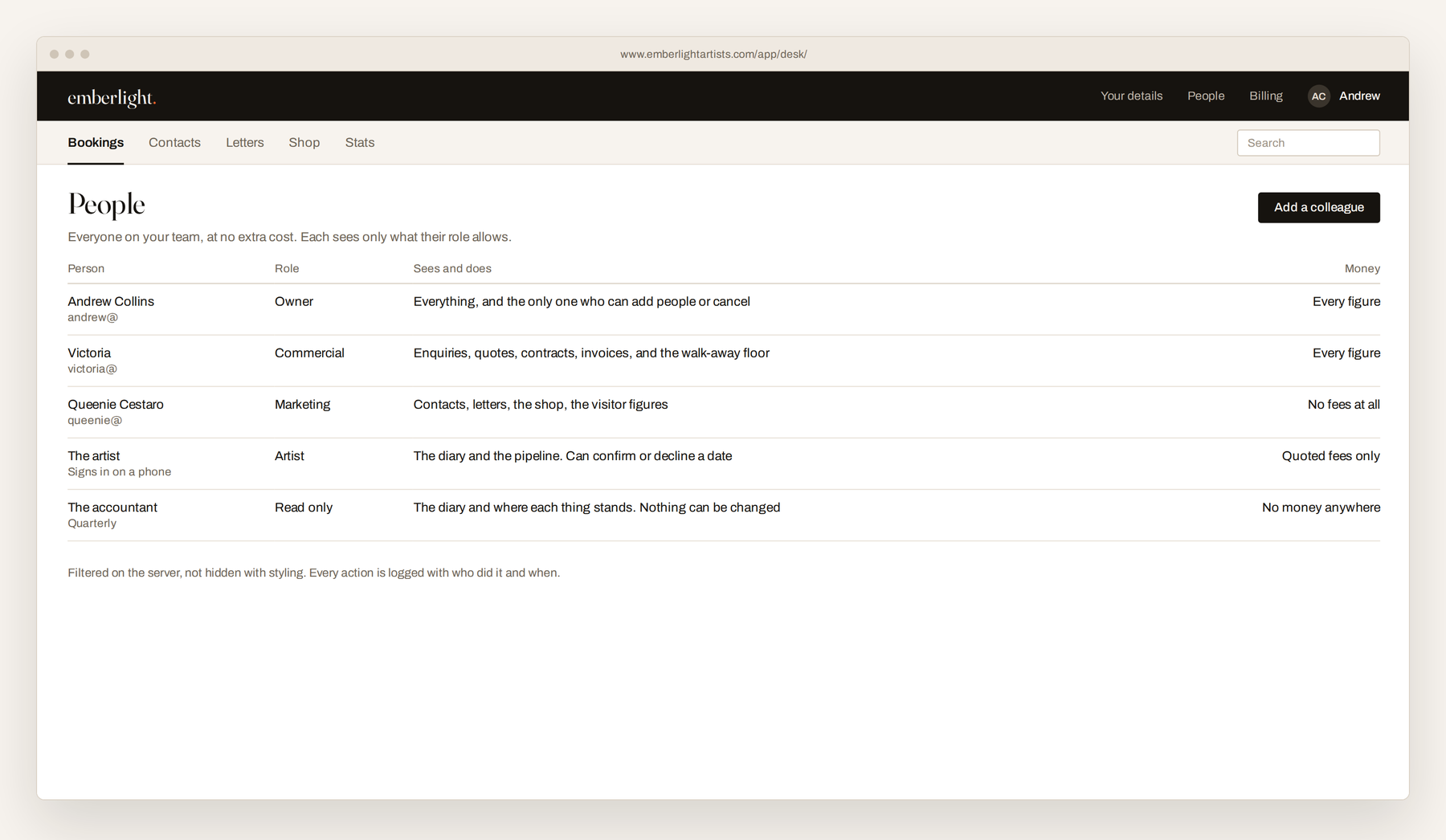
Colleagues cost nothing, and see only their part
Add as many people as you need at no extra cost. Five roles: owner, commercial, marketing, artist, and read only. The marketing person sees contacts, letters and the shop and no fees at all. The artist sees the diary and what a client has been quoted, and can confirm or decline a date.
The figures a colleague should not see are filtered on the server and never reach their browser, rather than being hidden with styling. Every action is logged with who did it and when.
Making it yours
There is nothing in here with our name on it
Fill in one page and every document, link and email the desk produces carries your business instead of ours. Your clients never learn we exist.
Your name and logo
Upload a logo, set a main colour, an accent and a background. Quotes, contracts, invoices, the client portal and the storefront take them on immediately.
Your company details
Registered name, company number, VAT number and address, printed where they legally need to be without you formatting anything.
Your bank details
Account, sort code, IBAN and BIC, plus your own payment link as a button on the invoice.
Your rate card
Your line ups, your two areas, your fees, and your private walk away floor that only the roles you choose can see.
Questions
The ones people actually ask
Getting started
How long does it take to set up?
You can be sending a quote the same afternoon. Fill in your business details and bank details on one page, put your rate card in, and that is the setup. Connecting your website's booking form is two lines, and if you would rather we placed them, send us the file and we will.
Do I need to be technical?
No. It runs in a browser, there is nothing to install and nothing to keep updated. If you can use online banking you can use this.
What do I have to fill in before it will quote?
Your rate card. It needs at least one line up with a fee, because a quote is built from it. Everything else, logo, colours, bank details, can follow afterwards.
Can I bring my existing bookings and contacts in?
Contacts, yes. Send us what you have as a spreadsheet and we will load it. Past bookings are usually not worth moving, since the value is in the ones still live.
Does it work on a phone?
Yes. It is the same product in a mobile browser, which is where most people check a date or answer an enquiry.
What it costs
What is the price?
£39.99 a month including VAT, which is £33.33 plus £6.66 VAT. That is the whole product and every colleague on your team. There is no setup fee, no contract and no minimum term.
Is there really no per user charge?
No per user charge. Add an assistant, a marketing person, your accountant and the artist, and the price does not move.
How does the free trial work?
Fourteen days, with nothing charged during them. A card is taken at signup so the subscription can start cleanly, and if you cancel before the trial ends you are not charged at all.
Who holds my card details?
Revolut. They are never seen or stored by us.
How do I cancel?
One tick and one press on the Billing page inside the product. Nothing further is charged. During the trial the desk stays open until the trial ends, and afterwards until the month you have paid for runs out.
What happens if a payment fails?
Revolut retries for a few days and you get an email. The desk stays fully open during that time. If it still fails the desk goes read only until a payment lands. Nothing is lost.
Is the price fixed?
The price you subscribe at is the price you keep. If we change what new subscribers pay, you stay where you are unless you choose to move.
Can I get a VAT invoice?
Every payment has one, on the Billing page, ready to print.
Your clients
Do my clients see Emberlight anywhere?
No. Quote pages, contracts, invoices, the client portal, the storefront and every email carry your business name, your logo, your colours and your bank details.
Do my clients have to create an account?
Never. Everything they need is reached by a long private link. Nobody should have to make an account to read what they are being asked to agree to.
How do I get paid by my clients?
Directly. Invoices carry your own bank details and, if you want one, your own payment link. We never hold or handle your clients' money, which means there is nobody standing between you and what you are owed.
Is an electronic signature on the contract valid?
In the United Kingdom and across the EU a typed signature with a record of who signed, when, and from where is a valid electronic signature for a performance agreement. The desk keeps that record with the signed PDF. For anything unusual or high value, take your own legal advice.
Can a promoter see all their bookings in one place?
Yes, each client can be sent a private portal link showing their own bookings and nobody else's. It saves a great deal of could you resend.
Your data
Where is my data kept?
In its own store, separate from every other subscriber, unreachable from any web address, with documents served only through private links.
Can Emberlight staff read my desk?
We do not open your desk in the course of running the service. Support is done by asking you, not by looking.
What happens to my data if I stop paying?
Nothing is deleted. The desk locks and everything stays where it is. Start the subscription again and it comes back as it was. Nothing is removed for ninety days after you leave.
Can I get my data out?
At any time, as a spreadsheet of every enquiry, contact, invoice and order. It is your record, not ours.
Does the website counter need a cookie banner?
It sets no cookie, stores no IP address and cannot identify a person, so it runs without one. That is also why its figures are complete rather than covering only the visitors who accept a banner.
Fit and support
Is it only for music?
It was built for artist management, so it thinks in dates, fees and rate cards. That fits anyone who sells their time on specific days: speakers, photographers, DJs, celebrants, tutors and small production companies. If you invoice for a diary rather than for hours, it will fit.
What is artist management software?
It holds the commercial side of representing an artist: the enquiries that come in, what each one was quoted, the contract that was signed, the invoice that followed, and the contacts behind all of it. It replaces the spreadsheet, the inbox folder and the Word contract template with one record per booking that moves from enquiry to paid without anything being retyped.
Who makes The Desk?
The software is built and owned by Soundcheck Software, a London software company, and licensed to Emberlight Artists. Your subscription, your invoices and your support all come from Emberlight.
How do I get help?
Write to contact@emberlightartists.com. A person answers, usually the same working day. If it is about one booking, include its reference and a screenshot.
One price
£39.99 a month, including VAT
Everything above is in it. As many colleagues as you need, at no extra cost. Fourteen days free with nothing charged until they end, no setup fee, no contract and no minimum term. Cancel from inside the product in one press and nothing is deleted.
Card details are taken by Revolut, never by us. Cancel during the trial and you are not charged at all.